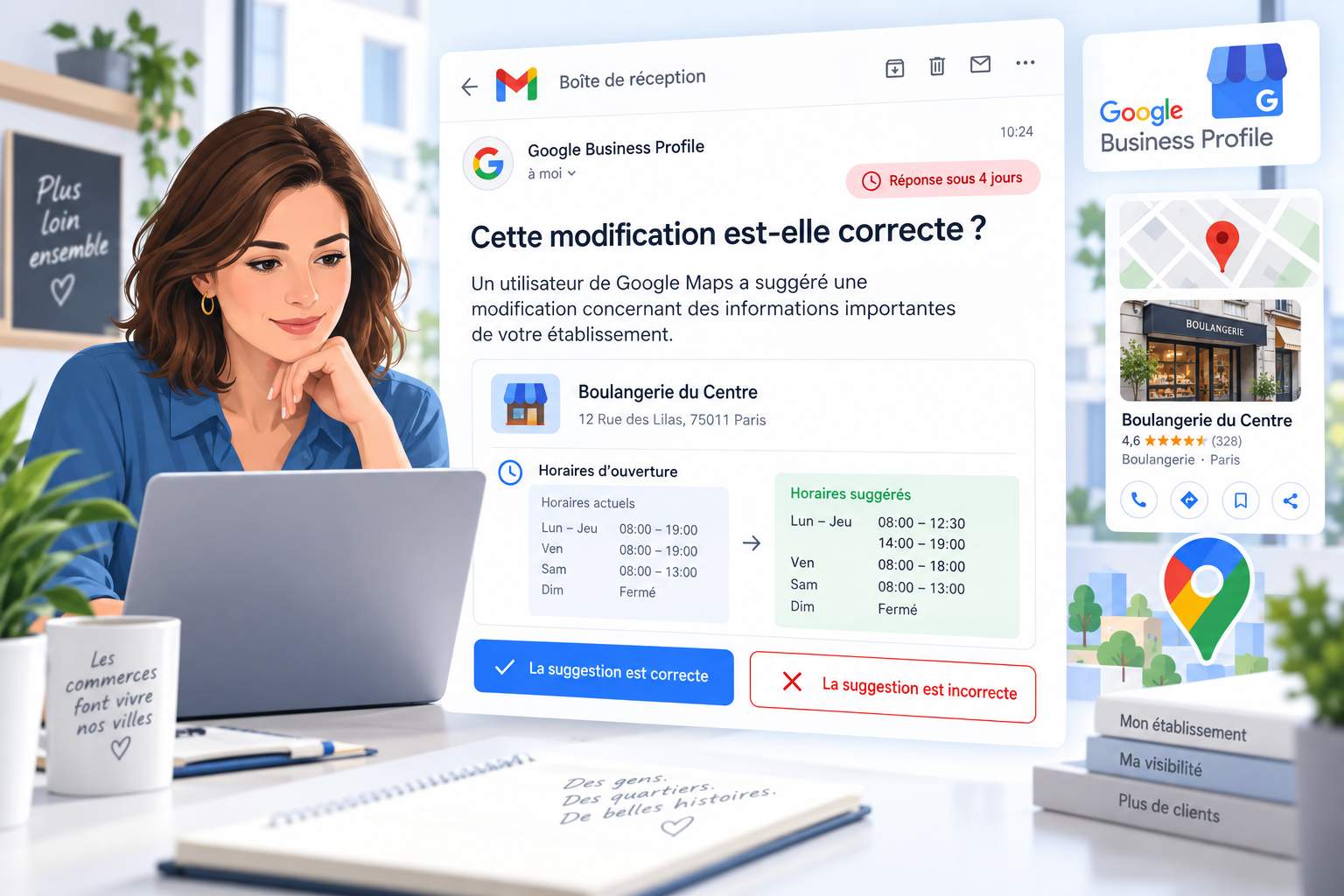
Do you manage a Google Business Profile? Keep an eye on your inbox. Google now sends an email titled “Is this change correct?” whenever a Google Maps user suggests changing important information about your business. You have 4 days to confirm or reject the suggestion. Here’s how to make the most of this new feature.
One email, two buttons, four days
Let’s look at a real-life example. A Lafarge Concrete plant receives this message: “A Google Maps user has noticed that some of the information on your business listing may no longer be up to date.” Details of the suggestion follow. Monday through Thursday, open from 7:30 a.m. to 11:45 a.m. and then from 1:00 p.m. to 3:30 p.m. On Friday, closes at 3:00 p.m. Saturday and Sunday, closed.
The email ends with two links: “The suggestion is correct” and “The suggestion is incorrect.” Just click on one. Google also reminds you that you can correct the listing yourself, as long as you follow its listing guidelines.
The English version is also circulating. Search Engine Roundtable reported on it on September 8, 2026, after it was spotted by consultant Lluc B. Penycate. In this example, the user suggested changing the name of the establishment.
Why is Google changing its approach
Users are editing listings on a massive scale. In 2025, the Google Maps community suggested 80 million updates: hours of operation, contact information, and names. Google blocked 79 million changes deemed inaccurate or unverified, according to its Trust & Safety report.
Until now, the owner often found out about the change after the fact. An incorrect schedule, a changed phone number, a falsified name—the customer would find the door closed, and you’d learn about it from a one-star review.
On April 16, 2026, Google announced on its official blog the rollout of proactive email alerts. The stated goal: to allow business owners to review significant changes before they go live. The same post notes that Gemini models now filter out inappropriate suggestions for business names.
Who receives these alerts?
Google reserves this feature for “verified and active” owners. Two conditions, two actions.
Verified. Your Google My Business listing must be claimed and verified. An unclaimed listing does not trigger any alerts.
Active. Google favors well-maintained listings. Post updates, add photos, and respond to reviews. Synup, an expert in the field, notes that an active listing is less likely to have third-party edits automatically accepted. Your visibility routine also acts as a shield.
Manage your notification preferences in the Google profile settings. Set alerts to be sent to an email account you check every day. The email address of the intern who left in 2022 is not valid.
Respond in Three Steps
- Compare the suggestion with reality. In the Lafarge example, does the 3:00 p.m. closing time on Friday match your schedule? A 30-minute discrepancy is enough to send a concrete mixer truck to a closed gate.
- Click the correct link. If the suggestion is correct, confirm it and save time. If the suggestion is incorrect, reject it immediately.
- Update the listing. If the actual situation differs from either version, change the hours yourself from your profile. Keep in mind special schedules: holidays, the Ascension Day long weekend, and August vacation.
Record each alert in a dated table. Repeated suggestions for the same field often indicate an inaccurately populated third-party directory—and sometimes malicious intent.
Be wary of fake emails
from
. Anything new attracts scammers. Before clicking, check the sender and hover over the links—they should point to a google.com domain. Google will never ask you for a password or verification code via email. If in doubt, open your profile directly from Google Search while logged into your account.
If an address or pin has been moved, proceed with caution. Sterling Sky notes that a significant change made from the owner’s account may trigger a new validation process.
Tomorrow, you’ll be verifying your own
data
This alert signals a change in your role. Google’s AI assistants draw their responses from your Google Business Profile. A scheduling error can quickly spread through a voice response: “Yes, the power plant is open on Saturday.” Your customers will find a padlocked gate.
The business owner becomes the certifier of their own information. Every quick response boosts the profile’s credibility in the eyes of the algorithms. Imagine a one-click validation from your smartwatch in the future, or a freshness indicator displayed to customers. Responsive businesses will gain a competitive edge.
Our advice: Treat these emails like a vendor invoice. Read them the same day, and make a decision within 24 hours.
Frequently asked questions
What happens if there’s no response within 4 days? Google makes the decision on its own, based on its other sources. You lose your say in the matter.
Can I block suggestions from users? No. The “Suggest an edit” button remains open to everyone. Your best strategy: a validated, active listing that’s consistent with your website and directories.
Does every change trigger an email? No. Google refers to “significant” changes, such as the name or hours of operation in the examples provided. For everything else, check your listing weekly.
Want to manage your Google listing on your own, without relying on an agency? Our ebook walks you through each setting step by step.
Sources
- Google, “New ways we’re protecting businesses on Maps,” official blog, April 16, 2026: https://blog.google/products-and-platforms/products/maps/new-ways-were-protecting-businesses-on-maps/
- Barry Schwartz, “Google Business Profile Email: Does This Look Right To You,” Search Engine Roundtable, September 8, 2026: https://www.seroundtable.com/gbp-does-this-look-right-to-you-email-42030.html
- Dorian Menard, “Anyone Can Edit Your Google Business Profile,” Search Scope, updated May 21, 2026: https://searchscope.com.au/google-business-profile/optimisation/protecting-your-google-business-profile-why-monitoring-suggested-edits-is-critical/
- Google, Trust & Safety Maps Report: https://transparencyreport.google.com/maps-content/overview